
How to Write a Show-Stop Procedure for an Outdoor Event
EVENT PLANNING GUIDE
How to Write a Show-Stop Procedure for an Outdoor Event
Updated on September 26, 2026 | Written by Rachella Thomas

Lightning is moving towards the site. A crowd incident has broken out at the other end of the event. Something serious has happened, and your event can no longer continue safely.
How do you actually stop the event?
It sounds straightforward until you picture a large outdoor event with performers, suppliers, staff and thousands of people spread across different areas.
There may be no central PA. Your team may be working across multiple zones. A performer could be on stage hundreds of metres from Event Control. And while someone is deciding what to do, the event is still happening.
That's why “we'll deal with it if it happens” isn't a show-stop procedure.
You need to know who can make the decision, how that decision reaches the people who need to act, what each of them does next and how you communicate with your audience.
Here's how I'd work through it.

What Is a Show-Stop Procedure?
A show-stop procedure sets out how an event, performance or activity will be paused or stopped when continuing would create an unacceptable safety risk.
Depending on the event, it could be triggered by:
Severe or dangerous weather
Fire or smoke
Unsafe crowd conditions
A security incident
Structural or technical failure
A serious medical or safety incident
Another situation identified through your event risk planning
A show stop may affect one activity, one area or the entire event.
The important part is deciding how the process works before you're in the middle of the incident.
Your show-stop procedure should also connect with your broader event safety and emergency planning. If stopping an event means moving people, closing areas, changing access or communicating emergency information, those plans need to work together.
Pro Tip: Weather is one of the most common reasons an outdoor event may need to pause or stop. If you're working through your weather contingencies, read How to Plan for Weather Risks at an Outdoor Event for more on monitoring, thresholds and deciding when conditions require action.
Why Outdoor Events Need Extra Thought
For an event inside a conventional venue, you’ll probably have a PA system throughout the venue, established emergency procedures, assigned venue staff and the activity is held in a relatively contained area. Outdoor events, by contrast, don’t have this convenient set-up ready to go.
Think of a street festival or community event stretching across several blocks. Event staff could be stationed hundreds of metres apart. So could your audience.
You might have no central PA system. Radio or mobile coverage might be unreliable in parts of the site. Some team members may be dealing directly with the public while others are backstage, at entrances or working in completely different event zones.
Suddenly, stopping the event isn't just a decision. It's a communication exercise across a long stretch of land. The challenge: how do you let everyone know what to do next?
That's why it's worth working through the process step by step before you need it.
Step-by-Step Process to Build a Show-Stop Procedure
1. Define the Triggers
Start by identifying the circumstances that could require an activity or the event to pause or stop. These should come from your event-specific risk assessment and relevant operational, safety and technical advice.
For example:
Weather conditions exceeding agreed safe operating limits
Fire or smoke
Unsafe crowd behaviour or density
Loss or failure of critical infrastructure
A structural concern
A security threat
Avoid vague instructions in your risk plan such as “stop if the weather gets bad.”
Be specific about what triggers action. If X happens, we will do Y.
For example, decide what weather conditions mean you'll increase monitoring, change or pause an activity, stop the event, or allow it to restart. Then make sure the people responsible for those decisions know what they're looking for and what they're expected to do.
2. Decide Who Can Call a Show Stop
Don't wait for something to happen to decide who has the authority to make the final call.
Your procedure should identify who can initiate a show stop and who needs to be consulted.
Depending on the event, that might involve:
Event Manager
Event Safety Manager
Venue representative
Production Manager
Security
Emergency services
Relevant technical specialists
Everyone needs to know where that final authority sits.
Your procedure should also cover situations that require immediate action to protect people from serious or life-threatening danger. Make it clear who can stop an activity or event immediately if the person with final decision-making authority cannot be reached.
In an emergency, your team shouldn't be waiting for permission while people are in danger.
3. Work Out How the Message Travels
Now test the communication flow.
If Event Control makes the call, how does that information reach every area that needs to stop?
Your message system might include:
Two-way radios
Mobile phones
Area wardens
Stage or production managers
Megaphones
Runners
Pre-agreed communication channels
Backup methods if the primary system fails
For a large event, divide the site into zones and establish who is responsible for receiving and acting on the message in each one.
Use clear, agreed terminology to avoid ambiguity about what is happening. Don't just write the communication chain. Test it. How long does it actually take for a message from Event Control to reach the furthest part of your site?
4. Plan What Happens Next
A show stop doesn't always mean ending the entire event.
Depending on what's happened, you might pause a performance, stop one activity, close part of the site or temporarily hold the program while you assess the situation. Sometimes that's enough. Other incidents may require the whole event to stop, people to shelter or an evacuation.
Work through what each response level actually means for your event, and what different groups need to do when the instruction is given.
That might include:
Performers
Production teams
Suppliers
Security
Staff and volunteers
Area wardens
Food vendors
Exhibitors
Audience members
If you pause the program, what happens to performers and the audience? If one area closes, where do people go? What do security, production, suppliers, staff and volunteers need to do? If the event stops completely, do people remain where they are, move somewhere else, shelter or evacuate?
Don't leave the instruction at “stop the event.” The people receiving that instruction need to know what they're expected to do once they hear it.
And make sure those actions connect with your wider emergency and crowd-management plans, so solving one problem doesn't create another somewhere else.
5. Prepare the Audience Communication
Don't leave your public announcement until the moment you need it.
Prepare simple messages in advance for the scenarios you've identified.
For example:
For everyone's safety, we're temporarily pausing the event. Please follow the directions of event staff and make your way to [location/action]. We'll provide further information as soon as possible.
Think about both on-site and online communication.
People already at the event need clear instructions on what is happening and what to do next. Depending on your event, you might communicate that through the PA, stage announcements, screens, signage, security, event staff, or other on-site channels.
Your online audience may need something different. Update your website, social media, ticket holders or other relevant channels so people who haven't arrived yet know whether the event is delayed, paused, cancelled or still proceeding.
Also decide who is responsible for publishing those messages and who approves them. You don't want conflicting information appearing across different channels while an incident is unfolding.
The exact wording will depend on the incident and your emergency plan. The important thing is that your team knows what can be communicated, who communicates it and where people should go for the next update.
6. Plan for What Happens After the Stop
A show stop doesn't necessarily mean the event is over.
Your procedure should also consider:
Who decides whether the event can restart
What needs to be checked first
Who needs to approve the restart
How teams are notified
How the audience is informed
How activities restart safely
When a temporary stop becomes a cancellation
Resuming the event deserves as much thought as stopping. Just because the immediate problem has passed doesn't mean you can restart the event immediately.
If severe weather caused the stop, for example, you may need to check temporary structures or equipment before people return. After a crowd incident, you may need to clear an area or change access. A technical failure may need inspection and testing.
Work out who needs to check what, who gives the final approval to restart and how that decision is communicated across the event.
Then think about the practical restart itself. Does the program pick up where it stopped? Do timings need to change? Are suppliers, performers and staff ready? What does the audience need to know?
Stopping safely is only half the procedure. You also need a plan to get the event moving safely again.
Read What Happens When the Run Sheet Goes Off Schedule?
A Procedure Only Works If Your Team Can Use It
A show-stop procedure isn't useful because it exists in your event manual. It's useful because on-site staff know what to do when they hear the call.
Brief the relevant team before the event. Give key personnel quick-reference information if appropriate. Test your communication methods. Make sure your backup systems actually work.
And make the procedure specific to the event in front of you. A show stop at a theatre, conference, street festival and multi-stage outdoor event will not look the same.
Know what could make you stop. Know who makes the call. Know how the message travels. Know what happens next.
Because event day is not the time to work any of that out.
Your show-stop procedure should sit within your broader event risk and emergency planning. The Event Risk Management Kit gives you professional templates and structure to identify, assess, and document risks across your event, including the controls, responsibilities, and actions you put in place to manage them.
Note: Event safety requirements vary by event, location and applicable laws. Develop your procedures as part of your event-specific risk and emergency planning, with suitably qualified safety, venue, technical and emergency personnel where required.
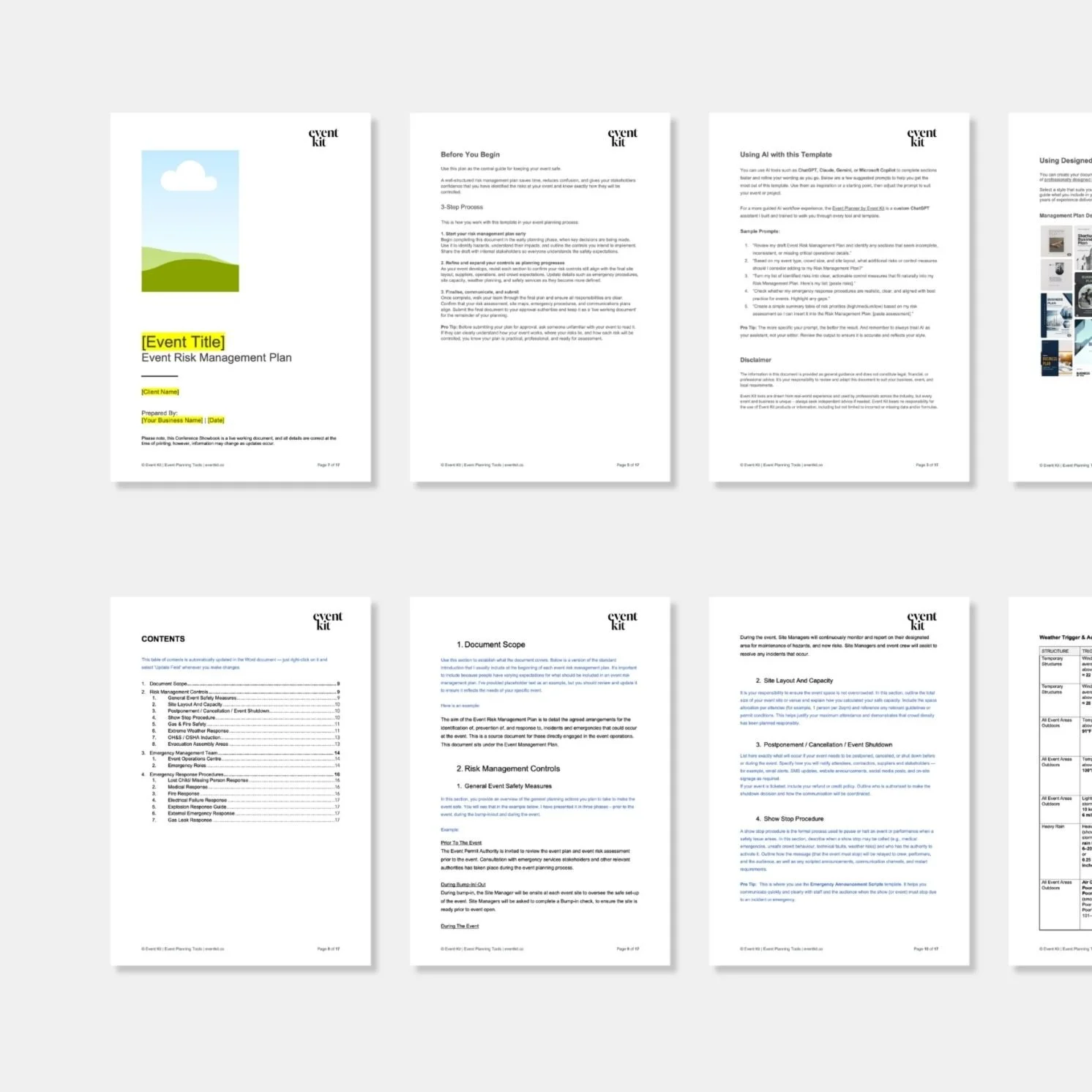
Put the planning into practice. This template preview includes a dedicated section for your show-stop procedure. It’s one of the professional tools you can get in Event Kit’s Event Risk Management Kit.
→ If you found this useful, feel free to share it with a fellow event planner or your event network. They’ll appreciate you passing it on.
Related Reads


Meet Your Mentor
Rachella Thomas is an award-winning event producer with more than 26 years of experience delivering major events. Her work includes the Australian Open, Commonwealth Games Queen’s Baton Relay, Melbourne Food & Wine Festival, and other renowned large-scale events and festivals.
Rachella founded Event Kit, where she turns decades of professional event know-how into practical tools for event planners worldwide.
Learn More → ABOUT






Want to try Event Kit?
Get a professional Event Run Sheet template for free!





Description
Event Risk Management Kit
Designed for:
Event planners and professionals responsible for risk assessments, safety planning, emergency procedures and incident management at events.
Helps you:
Plan for the worst. Hope for the best. Identify, assess and manage event risks with professional templates for risk assessments, safety controls, emergency planning and incident reporting.
What’s included:
PDF
• Event Risk Management Guide
• Key Risks for Public Events and Festivals
POWERPOINT
• Event Volunteer Safety Briefing Presentation
WORD
• Emergency Announcement Scripts
• Event Incident Report
• Event Management Plan
• Event Risk Alcohol Safety Checklist
• Event Risk Assessment Matrix
• Event Risk Controls Checklist
• Event Risk Management Plan
• Event Risk Planning Checklist
• Event Risk Pre-Open Checklist
• Event Risk Stage Safety Checklist
• Event Site Safety Checklist
• Lost Child Checklist
• Lost Property Logbook
Plus:
• Built-in planning tips and guidance notes
• AI prompts to help you work faster
Pairs well with:
Any collection in the shop. There's no wrong combination — grab what fits your events and build from there.
Note: This is a digital product. No physical item is shipped.
Customer Service
Within a few minutes of purchase, you’ll receive an email with a link to download your files. The download link expires after 24 hours. If you can’t find the email, please check your Spam or Junk folder.
Need help getting started?
Notes and instructions are built into our templates to give you structure, guidance and practical real-life examples. These are not blank templates. They’re designed to guide you as you use them.
Still got questions?
Template Manual
FAQs
Contact Us
Template License
Event Kit templates are licensed for use by one business or sole operator. You can edit, customize and reuse them across every client, event, and project your business handles. Add your own branding, update colors and fonts, remove sections you don't need, and adapt the content to suit you.
Read full Template License