
How to Plan for Weather Risks at an Outdoor Event
EVENT PLANNING GUIDE
How to Plan for Weather Risks at an Outdoor Event
Updated on September 26, 2026 | Written by Rachella Thomas

It’s a week before your outdoor event, and the forecast shows an 80% chance of rain. Do you cancel?
Probably not.
But what if it’s predicting severe storms?
Now imagine it’s event day. You’re on site, the wind is getting stronger, the sky is getting darker, and everyone is looking at you.
What do you do?
It's easy to talk about risk contingencies when the weather is theoretical. The hard part is knowing when conditions have crossed the line, and you actually need to act.
Weather decisions aren't always clear-cut. Forecasts shift, conditions change, and the point at which weather becomes a problem will be different for every event. That's why you need to decide in advance what you'll monitor, when you'll act, who makes the call and what happens next.
Here's how I'd plan for weather risk at an outdoor event.
1. Identify the Weather Risks
Start with your event, your site and your infrastructure rather than a generic list of weather hazards.
Consider what could happen if you experience:
Heavy rain
Strong winds or gusts
Lightning or thunderstorms
Extreme heat
Extreme cold
Poor visibility
Flooding or waterlogged ground
Then consider what those conditions could affect.
Could wind affect temporary structures, signage or equipment? Could heavy rain make pedestrian areas slippery or inaccessible? Could heat create additional risks for attendees, staff or performers? Could weather prevent suppliers from safely completing bump-in?
The risk isn't simply “bad weather”. List each specific type of weather condition and consider how it might affect your event.
2. Establish Your Weather Thresholds
This is where weather planning becomes useful.
Rather than waiting until event day and deciding whether conditions feel unsafe, determine in advance what conditions require action.
You might establish different levels of response:
Monitor → Modify → Pause → Stop
A change in conditions might initially mean increasing monitoring. If conditions worsen, you might modify part of the program, close an area or temporarily pause an activity. More serious conditions could trigger your show-stop or cancellation procedures.
The actual thresholds will depend on your event, site, infrastructure and relevant specialist advice.
The key is to have your team decide the process before the weather hits.
3. Decide Who Monitors and Who Decides
Your plan should make it clear:
Who is monitoring the weather?
What information or forecasting source will they use?
How often will conditions be reviewed?
Who receives that information?
Who has authority to modify, pause or stop activities?
Who needs to be consulted before making that decision?
For larger or higher-risk outdoor events, you may also need specialist weather, structural, production or safety advice. Don't simply write “monitor weather” in your risk plan. Give the task an owner.
4. Decide What Happens at Each Threshold
Now connect the weather condition to an action.
For example, your response might involve:
Delaying an activity
Moving something undercover
Securing or removing temporary infrastructure
Changing the program
Closing an area
Pausing a performance
Sheltering or relocating attendees
Stopping the event
Cancelling or postponing
This is where your weather plan connects with your broader risk, emergency and operational planning. If deteriorating weather could mean pausing or stopping your event, it’s also worth having a clear show stop procedure in place.
The show stop procedure explains how to plan the decision, communication, and response across your site. It covers who makes the call, how the message travels across the site, what happens next and how you plan for a safe restart.
Read How to Write a Show-Stop Procedure for Outdoor Events
5. Plan the Communication Before You Need It
If weather changes your event, several groups will need information quickly. It’s up to you to decide who that includes, but it might be your team, suppliers, performers, contractors, stakeholders, and attendees.
Work out in advance:
Who communicates with each group
Which channels you'll use
What information they need
How you'll communicate updates
Who approves public messaging
For events with large or dispersed sites, also consider what happens if your normal communication method fails. A decision isn't much use if you can't get it to the people who need to act.
You Can't Control the Weather. You Can Control the Plan.
You can’t predict exactly what the weather will do on event day.
What you can do is control the plan. Decide in advance what you're monitoring, what conditions require action, who makes the call and what happens next.
Then, if weather conditions start to change, your team isn't scrambling, wondering, “What do we do?” You've already had that conversation, and you’ve developed a plan.
Risk Management Kit - Event Planning Templates
Your event risk plan should document weather contingency decisions alongside the other risks you're managing across the event. If you’d rather not build those documents from scratch, our Event Risk Management Kit gives you the professional structure and ready-to-use tools to identify, assess and document those risks, along with the controls and actions you've agreed to put in place.
The Risk Management Kit includes key event planning documents: spreadsheets, checklists, and templates that turn your overwhelming to-do list into a ready-made event safety plan.
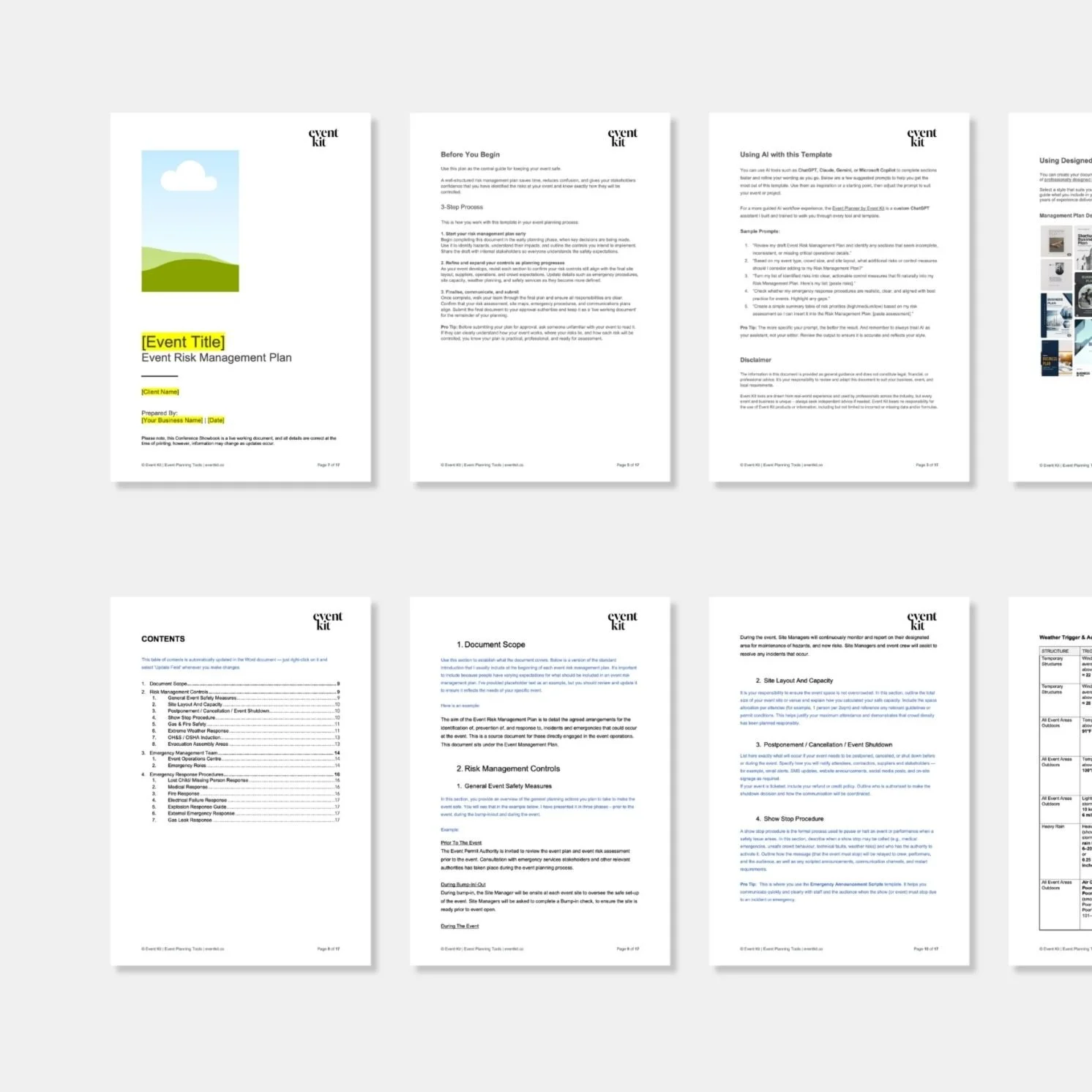
Put the planning into practice. This template preview includes a dedicated section for your weather risks. It’s one of the professional tools in Event Kit’s Event Risk Management Kit.
→ If you found this useful, feel free to share it with a fellow event planner or your event network. They’ll appreciate you passing it on.
Related Reads



Meet Your Mentor
Rachella Thomas is an award-winning event producer with more than 26 years of experience delivering major events. Her work includes the Australian Open, Commonwealth Games Queen’s Baton Relay, Melbourne Food & Wine Festival, and other renowned large-scale events and festivals.
Rachella founded Event Kit, where she turns decades of professional event know-how into practical tools for event planners worldwide.
Learn More → ABOUT

Want to try Event Kit?
Get a professional Event Run Sheet template for free!





Description
Event Risk Management Kit
Designed for:
Event planners and professionals responsible for risk assessments, safety planning, emergency procedures and incident management at events.
Helps you:
Plan for the worst. Hope for the best. Identify, assess and manage event risks with professional templates for risk assessments, safety controls, emergency planning and incident reporting.
What’s included:
PDF
• Event Risk Management Guide
• Key Risks for Public Events and Festivals
POWERPOINT
• Event Volunteer Safety Briefing Presentation
WORD
• Emergency Announcement Scripts
• Event Incident Report
• Event Management Plan
• Event Risk Alcohol Safety Checklist
• Event Risk Assessment Matrix
• Event Risk Controls Checklist
• Event Risk Management Plan
• Event Risk Planning Checklist
• Event Risk Pre-Open Checklist
• Event Risk Stage Safety Checklist
• Event Site Safety Checklist
• Lost Child Checklist
• Lost Property Logbook
Plus:
• Built-in planning tips and guidance notes
• AI prompts to help you work faster
Pairs well with:
Any collection in the shop. There's no wrong combination — grab what fits your events and build from there.
Note: This is a digital product. No physical item is shipped.
Customer Service
Within a few minutes of purchase, you’ll receive an email with a link to download your files. The download link expires after 24 hours. If you can’t find the email, please check your Spam or Junk folder.
Need help getting started?
Notes and instructions are built into our templates to give you structure, guidance and practical real-life examples. These are not blank templates. They’re designed to guide you as you use them.
Still got questions?
Template Manual
FAQs
Contact Us
Template License
Event Kit templates are licensed for use by one business or sole operator. You can edit, customize and reuse them across every client, event, and project your business handles. Add your own branding, update colors and fonts, remove sections you don't need, and adapt the content to suit you.
Read full Template License